This essay opens a three-part series on running your own AI. Part 1 does the math on hardware and subscriptions, Part 2 documents what the cloud services do with your data, and Part 3 looks at where the policy fights over AI’s footprint are actually happening. This piece answers the question that comes before all of those: is opting out of the cloud version even possible, and is it worth it?
In July, a federal judge gave final approval to a $1.5 billion settlement, the largest copyright recovery in U.S. history, for authors whose pirated books were used to train an AI model without their permission. The approval is already being appealed, and the legal fight over AI training data is nowhere near finished.
But the settlement is only one entry in a growing record. A court order in the New York Times’ copyright suit against OpenAI required the company to preserve ChatGPT conversations its users had deleted, and later ordered 20 million of those logs produced to plaintiffs, a decision affirmed in January. In February, OpenAI retired GPT-4o from ChatGPT on about two weeks’ notice, over the objections of hundreds of thousands of users who had built routines around it. And every major consumer chatbot now trains on user conversations by default, including Anthropic’s Claude, which reversed its no-training stance in August 2025.

Taken together, the record has reasonable people asking a reasonable question: is there a way to use this technology without feeding the machine?
There is, and it runs on hardware you may already own. This article is an honest look at what that gets you, what it costs, and what it doesn’t fix.
Whether to use AI at all is your call, and this essay doesn’t argue it either way; if you do use it, where it runs is a custody decision you make at home. The fight over what the AI buildout costs everyone is a political fight with a docket number, and it is Part 3’s subject, not a reason to feel virtuous, or guilty, about a laptop.
What Running Your Own Actually Means
A local AI setup is simpler than it sounds. You download a model, a file of a few gigabytes published under an open license by groups like Alibaba, Meta, Mistral, or the Allen Institute for AI, and you run it with free software like LM Studio or Ollama on a computer you already have. You pick the model’s size to fit your machine, the way you’d pick a game your graphics card can handle.
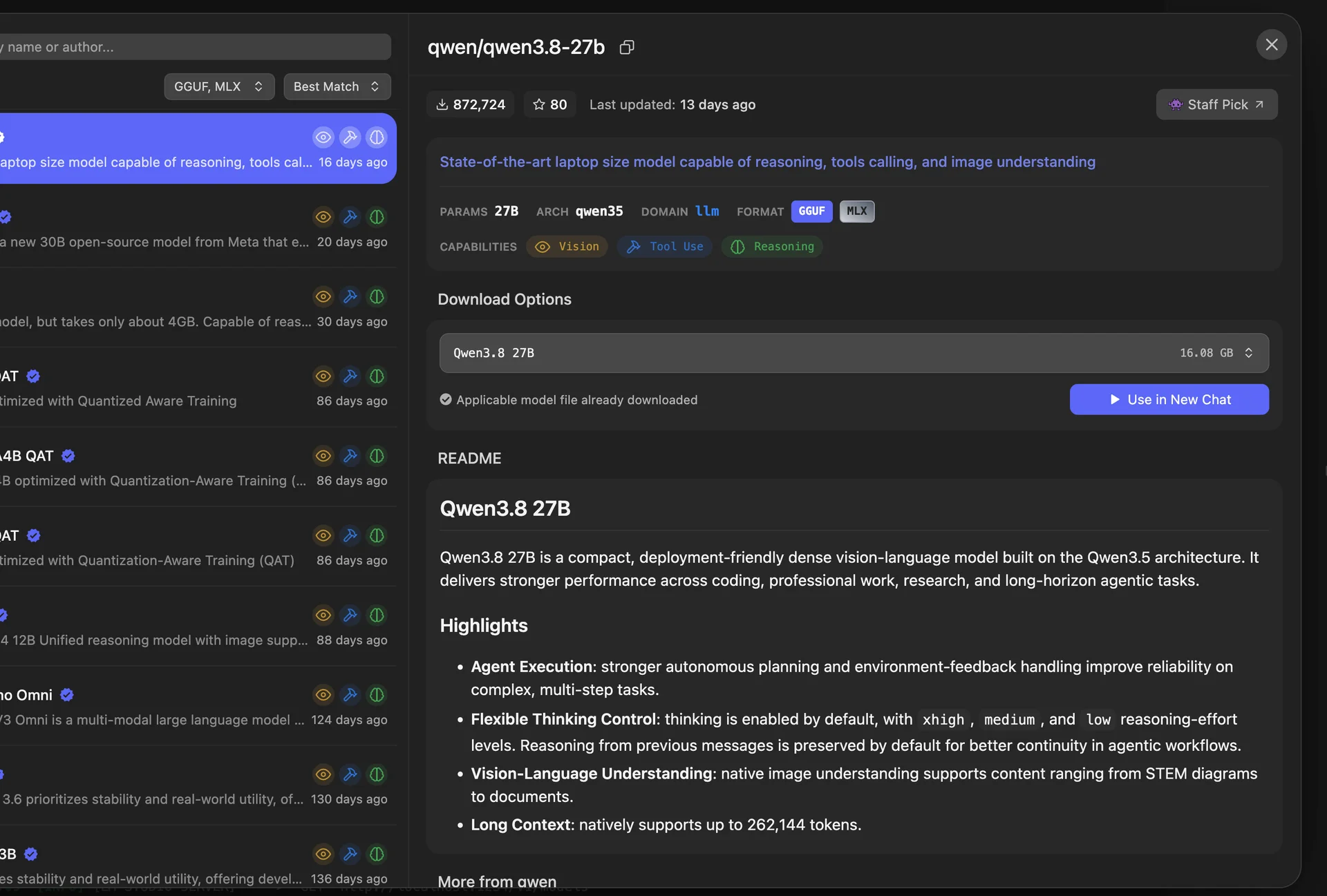
From then on, the model answers at reading speed with the Wi-Fi unplugged. There’s no account, no subscription, and no usage meter. If you’ve followed this site’s self-hosting series, the pattern is familiar: it’s the same move as running your own password vault or your own smart-home hub, applied to AI.
Five things change when the model lives on your machine.
Your copy can’t be retracted. The weights sit on your disk. No vendor can retire your model on two weeks’ notice, the way GPT-4o’s users learned in February, or rewrite its behavior overnight, the way ChatGPT’s users learned during 2025’s short-lived “sycophancy update.”
There’s no meter. No per-token pricing, no weekly usage caps, no subscription that gets repriced after you’ve built habits around it.
Your prompts stay in the house. Nothing you type becomes training data, a litigation exhibit, or a log line in someone else’s leaked database. Part 2 of this series documents why that matters more than most people assume.
The model doesn’t change unless you change it. Its behavior on the day you download it is its behavior a year later.
It works when the grid doesn’t. A model on a laptop in a blackout or a dead-signal stretch is the resilience case in its purest form: capability that doesn’t depend on anyone else’s infrastructure holding up.
Where It Genuinely Helps
Local AI is not a toy, but its strengths are specific, and it’s worth being precise about them.
The strongest case is sensitive material. If you work with client files, patient information, unpublished reporting, or anything else you’d hesitate to paste into a web form, a local model is currently the only way to use AI on that material without a third party in the loop. Part 2 goes into the legal and compliance detail; the short version is that for several professions, this isn’t a preference question anymore.
The second case is volume without a meter. Summarizing a hundred documents, translating an archive of correspondence, running the same extraction task every night: jobs where a per-token charge or a weekly cap would otherwise set the budget. Part 1 does this math properly, including the cases where the cloud is honestly cheaper.
The third is less obvious: local AI is a good way to learn how these tools behave, because you can see everything. You pick the model, you watch it load, you find its limits by hitting them.
Research on how people use AI assistants keeps converging on the same practical rule, and it applies doubly here: use these tools to learn, not to skip learning. Attempt the task yourself first, ask for explanations rather than finished answers, verify the output against sources you trust, and keep practicing anything you’d need if the tool vanished. A local setup, where nothing is gamified to keep you engaged, makes that discipline easier to keep.
The Resilience Case
The flagship use is a local model over your Project N.O.M.A.D. offline library. N.O.M.A.D. is this site’s build for a home server that keeps manuals, medical references, and repair guides on your own disk, no internet required. Add a model on top and the library becomes something you can ask questions: which ointment the first-aid guide recommends, which part number matches your water heater, what the repair manual means by reseating the valve. The answers come from documents you chose to keep, and they come at 2 a.m. with the internet down or priced out of reach.
The same setup works over your own preparedness documents: insurance policies, the household inventory with serial numbers and photos, garden plans and planting dates. Ask it which documents mention water damage, what the deductible actually is, or when the tomatoes went in last year, and it reads your archive instead of the open web. Because nothing leaves the house, you can do this with papers you’d never paste into a chat window.
Earlier we made a one-line promise: it works when the grid doesn’t. Here is the worked version. The power is out, the cell network is congested, and you’re on battery. A laptop and a small power station don’t care whether the internet behind them is alive. Your library, your documents, and the model that reads them are all still there, still answering, because none of them ever depended on someone else’s building staying lit.
One discipline governs all of it, the same rule as above: use AI to learn, never to skip learning. The Master Gardeners who tested these tools published the working method: give the model your zone, soil, and constraints, then verify its answer against your Extension office’s publications. The model finds the right page; the primary source gets the last word. That holds for tomato blight, and it holds double for a medical reference in a blackout.
The Honest Trade
Here is the honest trade at the center of local AI, and I’d rather state it plainly than oversell it: moving the model onto your machine solves the custody, metering, and retraction problems. It does not solve everything, and three limitations deserve plain statement.
It doesn’t settle the training-data question. Most open models descend from the same web-scraped training corpora as the cloud services, so running one at home doesn’t resolve any creator’s complaint about how it was made. A small branch of the field is trying to do better: Pleias trained a model exclusively on public-domain and permissively licensed text, and Switzerland’s Apertus project honored website opt-outs retroactively and published everything about its process. These ethically sourced models are real, and today they’re noticeably less capable than the alternatives. That’s the current price of clean data, and it’s worth paying attention to as it changes. If creator compensation matters to you, that concern is better directed at the lawsuits, licensing frameworks, and opt-out registries working on it directly than at your own hardware choices.

The capability gap is real. Open models you can run at home trail the frontier services, by roughly four months on public benchmarks by Epoch AI’s measure, and by more on the hardest tasks. For drafting, summarizing, translating, and answering questions, the gap rarely matters. For the most demanding work, it does. Part 1 maps exactly where the line falls.
The risks don’t disappear; they move. A tool that answers fluently and wrongly is still fluent and wrong when it runs on your own disk, and research on AI-assisted work consistently finds people overestimate how much it helps them. The discipline from the previous section is the mitigation. And running your own server means being your own security team: researchers counted 175,000 Ollama servers reachable from the public internet by January 2026, many being actively exploited. The rules are short (download from trusted sources, never expose the server to the open internet) but they’re yours to follow.
One thing local AI does not require, despite what you may have heard: a meaningful energy footprint. A median text prompt measured by Google at 0.24 watt-hours means a household’s local use is a rounding error next to the data-center buildout, and buying new hardware “for the planet” doesn’t pencil out either. The footprint fight is a policy question, and it’s Part 3’s subject, not a reason to feel virtuous or guilty about a laptop.
Who This Is For, and Who It Isn’t
This is for you if you handle material that shouldn’t leave your control; if you run high volumes of routine AI tasks and want a flat, predictable setup; if you work offline or care about tools that survive outages; or if you simply want to understand this technology by owning a piece of it, knowing that understanding is the goal.
This is probably not for you if your AI use is occasional questions and your data isn’t sensitive. The free and low-cost cloud options are good, and Part 1 is honest about that: for casual use, the cloud wins on cost and convenience, and no one should buy hardware to save money they weren’t spending.
Try It Tonight
The lowest-commitment version takes about five minutes. Install LM Studio on the computer you already own, browse its model list, and download something in the 7-to-9-billion-parameter range, the size class any recent laptop handles comfortably. Ask it to condense a long document, draft an email, explain a concept. Unplug the Wi-Fi and notice it still works.
You’ll know by bedtime whether local AI is useful to you or just interesting, and either answer is fine.
And if you stay in the cloud, one five-minute step is still worth taking tonight: every major service has a setting to opt out of training on your conversations. Settings are promises, not architecture, and companies have changed them before. Set them anyway.
What Comes Next
The question this essay answered was whether a version of this technology exists that’s yours to shape. It does, with the caveats above in plain type.
The next three pieces get specific. Part 1 is the math: which models fit which hardware, what running your own actually costs, and the six reader profiles that decide whether it pays. Part 2 is the stakes: what the cloud services do with your conversations, documented with dates and docket numbers. Part 3 is the bigger picture: where the costs of the AI buildout are landing on household power bills, and the unglamorous institutions where ordinary people have been winning that fight. Each part takes up one piece of that position: Part 1 the cost math, Part 2 the cloud record, Part 3 the public fight.
None of them requires you to agree with this one. The math works either way.
Related reading
 Tech & Digital Resilience
Who Should Actually Run a Local LLM in 2026 — and Who Should Keep Paying $20
The answer depends entirely on which of six readers you are. For most of them, the honest answer is no. Here is the arithmetic anyway, so you can check it yourself.
 Tech & Digital Resilience
Self-Host Your Passwords with Vaultwarden: Every Premium Feature, Zero Subscription
Bitwarden doubled Premium to $19.80 a year and 1Password jumped 33% — while your vault still lives in someone else’s building. Vaultwarden runs the whole Bitwarden ecosystem on hardware you own: every premium feature, zero subscription.
 Tech & Digital Resilience
Pi-hole in a Weekend: Network-Wide Ad Blocking for Every Device You Own
Your smart TV is phoning home to ad servers, your phone apps are reporting to analytics endpoints — and neither can run an ad blocker. A Pi-hole fixes that at the network level for every device you own, in one evening, for less than a takeaway dinner.
Related reading

What to Download Before the Internet Goes Down: Building Your Offline Library
A curated download plan for your offline knowledge server: which Wikipedia packs, repair guides, and free libraries to grab first, with real file sizes and.

Who Should Actually Run a Local LLM in 2026 — and Who Should Keep Paying $20
The answer depends entirely on which of six readers you are. For most of them, the answer is no.

Self-Host Your Passwords with Vaultwarden: Every Premium Feature, Zero Subscription
Bitwarden doubled Premium to $19.80 a year and 1Password jumped 33% — while your vault still lives in someone else's building. Vaultwarden runs the whole …